·4 min read
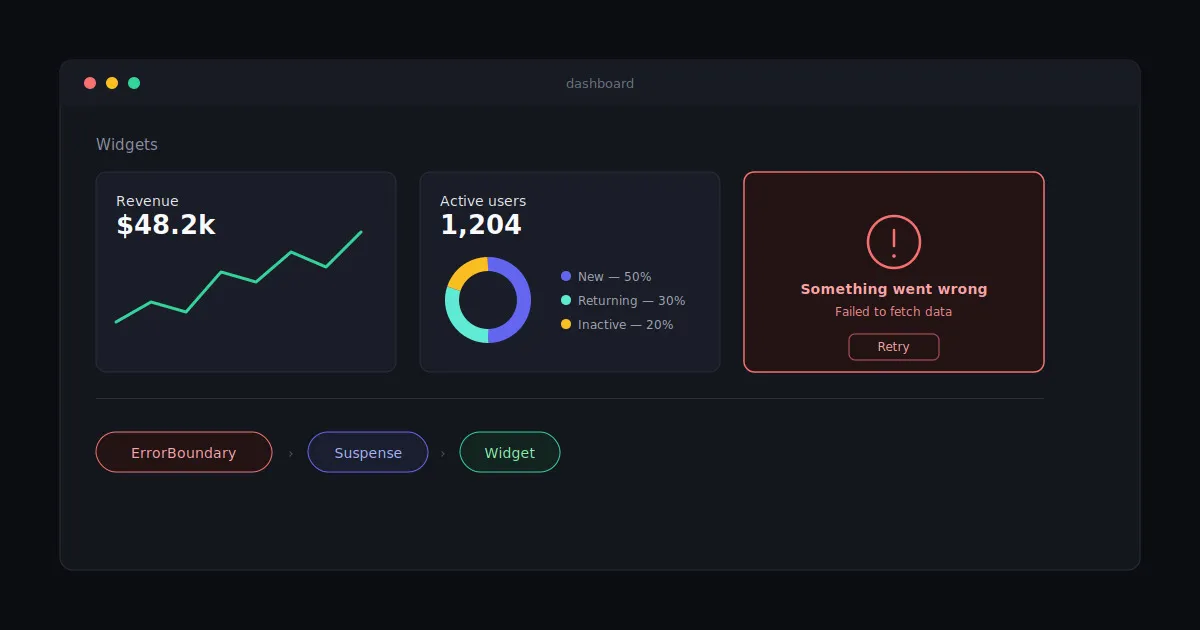
Component-Level Error Handling in Next.js App Router with ErrorBoundary
Next.js gives you error.tsx for handling errors at the route/segment level, and it works well for that. But it’s a blunt instrument one error anywhere in the segment, and the whole page’s fallback UI takes over.
That’s too coarse for dashboards, charts, or any page built out of several independent widgets. If one widget’s data fetch fails, you don’t want to lose the rest of the page you want that one widget to show a fallback while everything else keeps working.
The fix is the same one React has always had for this: an ErrorBoundary, scoped to the component that might fail, paired with Suspense for the loading state.
The ErrorBoundary component
This is a standard class-based error boundary (React doesn’t have a hook equivalent yet), built to support three levels of fallback flexibility no fallback prop, a static fallback node, or a function that receives the actual error.
"use client";import React from "react";
interface Props {  children: React.ReactNode;  fallback?: React.ReactNode | ((error: Error) => React.ReactNode);  onError?: (error: Error, errorInfo: React.ErrorInfo) => void;}
interface State {  hasError: boolean;  error: Error | null;}
export class ErrorBoundary extends React.Component<Props, State> {  constructor(props: Props) {    super(props);    this.state = { hasError: false, error: null };  }
  static getDerivedStateFromError(error: Error): State {    return { hasError: true, error };  }
  componentDidCatch(error: Error, errorInfo: React.ErrorInfo): void {    console.error("ErrorBoundary caught an error:", error, errorInfo);    if (this.props.onError) {      this.props.onError(error, errorInfo);    }  }
  render() {    if (this.state.hasError && this.state.error) {      if (typeof this.props.fallback === "function") {        return this.props.fallback(this.state.error);      }      if (this.props.fallback) {        return this.props.fallback;      }      // Default fallback UI      return <DefaultErrorFallback error={this.state.error} />;    }    return this.props.children;  }}
const DefaultErrorFallback: React.FC<{ error: Error }> = ({ error }) => {  return (    <div className="flex items-start gap-3 py-4 px-5 bg-red-50 dark:bg-red-900/10 border border-red-200 dark:border-red-800 rounded-lg">      <svg        className="size-5 text-red-500 dark:text-red-400 shrink-0 mt-0.5"        fill="none"        viewBox="0 0 24 24"        stroke="currentColor"      >        <path          strokeLinecap="round"          strokeLinejoin="round"          strokeWidth={2}          d="M12 9v2m0 4h.01m-6.938 4h13.856c1.54 0 2.502-1.667 1.732-3L13.732 4c-.77-1.333-2.694-1.333-3.464 0L3.34 16c-.77 1.333.192 3 1.732 3z"        />      </svg>      <div className="flex-1 space-y-1">        <p className="text-sm font-semibold text-red-800 dark:text-red-400">Something went wrong</p>        <p className="text-xs text-red-600 dark:text-red-500">{error.message || "An unexpected error occurred"}</p>      </div>    </div>  );};
That’s it one client component, no dependencies. Everything below is just usage patterns.
Usage patterns
1. Default fallback
<ErrorBoundary> <Suspense fallback={<LoadingFallback />}> <Widget /> {/* Server Component with server action data fetch */} </Suspense></ErrorBoundary>- Uses the internal
DefaultErrorFallback - No custom fallback UI
Good enough when you just want a widget to fail gracefully without a custom design pass.
2. Custom fallback UI as a static node
<ErrorBoundary fallback={<ErrorFallback />}> <Suspense fallback={<LoadingFallback />}> <Widget /> {/* Server Component with server action data fetch */} </Suspense></ErrorBoundary>- Good for custom fallback UI
- Cannot show dynamic error messages the node is static, so it has no way to reference what actually broke
3. Custom fallback UI as a function (recommended)
ErrorBoundary is a Client Component, and its fallback function needs to live in a Client Component too you can’t pass an inline arrow function as a prop from a Server Component. The clean way around that is a thin client wrapper:
"use client";
export const ErrorBoundaryWrapper: React.FC<{ children: React.ReactNode }> = ({ children }) => {  return <ErrorBoundary fallback={(error) => <ErrorFallback error={error} />}>{children}</ErrorBoundary>;};
Then use it directly from a Server Component page:
<ErrorBoundaryWrapper> <Suspense fallback={<LoadingFallback />}> <Widget /> {/* Server Component with server action data fetch */} </Suspense></ErrorBoundaryWrapper>- Custom fallback UI
- Access to the actual error object
- Dynamic, per-error messages
This is the pattern I reach for by default the wrapper is boilerplate you write once per fallback design, and every widget that uses it gets a real error message instead of a generic “something broke.”
Why this matters
Component-level error handling means one failing widget degrades gracefully instead of taking the whole page down with it. For dashboards, charts, or any page assembled from several independent data-fetching widgets, that’s the difference between “one chart is down” and “the entire page is broken.”
error.tsx still has its place for route-level failures. This pattern just fills the gap underneath it scoped to exactly the component that might fail.